








ACEBOTT Robot Kit ! Robotics for Kids Ages 8-16 ! STEM Toys for Boys.

The Robot Kit That Turns Screen Time into Learning Time
Most “educational” robots sit on a shelf after one use. They are too complicated to assemble, too boring to program, or too fragile to survive a curious child. The ACEBOTT Robot Kit breaks every one of those patterns.
“Robotics for Baby Hypnotic New Toys” is not just a clever name. It means this robot is so engaging that kids (and honestly, adults) lose track of time while building, coding, and playing. The lights flash. The wheels spin. The sensors react. The robot follows lines, avoids obstacles, and responds to hand gestures. And behind all the fun, your child is learning real skills: wiring, programming logic, sensor integration, and problem-solving.
Designed for USA classrooms, homeschool families, and curious kids aged 8 and up, the ACEBOTT Robot Kit is the perfect entry point into robotics. No prior experience needed. No soldering. No expensive tools. Just open the box, follow the instructions, and watch a child’s eyes light up when their robot moves for the first time.
-

What Makes the ACEBOTT Robot Kit Different
The ACEBOTT Robot Kit is not a pre-assembled toy. It is not a box of loose parts with confusing instructions. It is a carefully designed learning system with three layers of engagement:
Layer What It Is What It Teaches Build Snap-together components, no soldering Mechanical assembly, spatial reasoning Wire Color-coded cables, labeled ports Basic electronics, circuit completion Code Drag-and-drop (Scratch) or Python Programming logic, variables, loops, sensors The robot comes with over 30 components: an ESP32 main control board, ultrasonic sensors, line-tracking sensors, Bluetooth module, servo motors, LED lights, buzzer, and a sturdy acrylic chassis. Every piece connects with simple cables – no soldering iron required.
Hypnotic Features That Keep Kids Engaged
The “Baby Hypnotic” name comes from the robot’s ability to hold attention. Here is what it can do right out of the box:
1. Line Following Mode
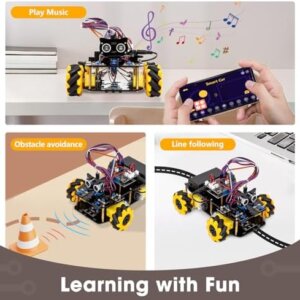
The ACEBOTT Robot Kit detects black lines on white surfaces using two infrared sensors. Place it on the included track (or draw your own with black electrical tape). The robot follows the line perfectly – left, right, curves, and intersections. Kids spend hours designing new tracks with tape on the floor.2. Obstacle Avoidance Mode
The ultrasonic sensor (like a bat’s echolocation) detects objects in front of the robot. The robot stops, turns, and finds a new path. Watch it navigate a room full of shoes, toys, and furniture without human help.3. Gesture Control Mode
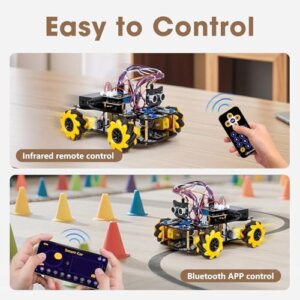
Wave your hand in front of the robot. It moves forward. Wave again – it stops. Wave left – it turns left. This mode uses the ultrasonic sensor to detect hand distance. No remote control needed. No phone app required (though app control is also available).4. Bluetooth App Control
Download the free ACEBOTT app (iOS and Android). Your phone becomes a remote control. Drive the robot around the house, change LED colors, play sounds through the buzzer, and switch between modes. Range: 30 feet.5. Light Show Mode
The robot has multiple RGB LEDs. Program them to cycle through colors, pulse to music, or light up when the robot turns. It looks like a tiny disco ball on wheels – and kids learn how to code RGB values (0–255 for red, green, blue).6. Object Following Mode (Advanced)
The robot detects an object (like a hand or a ball) and follows it automatically. It uses the same ultrasonic sensor but different programming logic. This mode teaches conditional statements: “If object distance is less than 10 inches, move forward. If greater than 20 inches, stop.” -


Easy Assembly – No Soldering, No Frustration
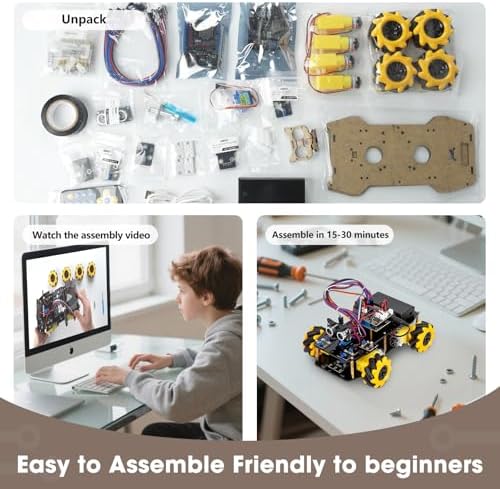
The ACEBOTT Robot Kit is designed for first-time builders. The instruction manual (full color, 48 pages, English only) walks you through every step with photographs, not just diagrams.
What you need: Nothing but your hands. The kit includes all cables, screws, and tools (small screwdriver included).
Assembly time:
-
First-time builder (child 8–12): 60–90 minutes
-
First-time builder (adult): 45–60 minutes
-
Experienced builder: 30 minutes
Assembly steps:
-
Build the chassis (acrylic plates + metal standoffs + wheels).
-
Mount the motors (left and right – color-coded wires).
-
Install the ESP32 control board (the robot’s “brain”).
-
Connect the sensors (ultrasonic, line-tracking).
-
Connect the battery pack (AA batteries not included – 6x AA recommended).
-
Add the LED lights and buzzer.
-
Attach the top plate.
-
Done.
Every cable is keyed (only fits one way). You cannot plug something in backward. Every port is labeled (D2, D3, 5V, GND). The manual shows exactly which cable goes where.
Coding – From Scratch to Python
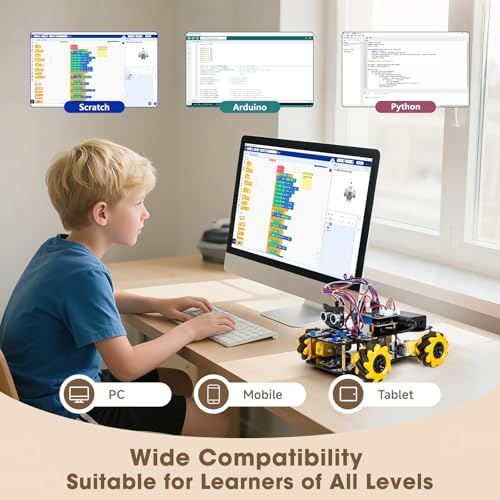
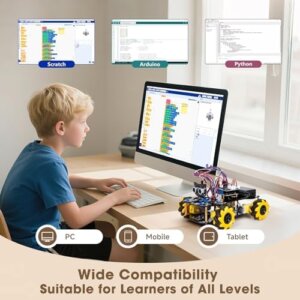
The ACEBOTT Robot Kit teaches two levels of programming:
Level 1: Scratch (Drag-and-Drop, Ages 8–12)
-
Visual programming. Blocks snap together like puzzle pieces.
-
No typing required. No syntax errors.
-
Includes 12 example projects in the software (line following, obstacle avoidance, etc.).
-
Runs in a browser (Windows, Mac, Chromebook) – no software installation needed.
Level 2: Arduino IDE / Python (Ages 12+)
-
Text-based programming. Real coding.
-
Open-source Arduino environment (free download).
-
Python support via esptool.
-
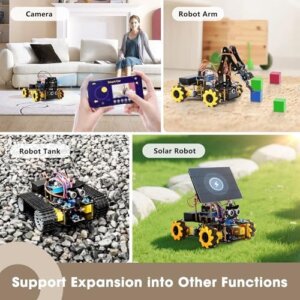
Full access to all sensors and motors. Program anything.


-
-

What’s in the Box (ACEBOTT Robot Kit)
Component Quantity ESP32 microcontroller board 1 Ultrasonic sensor (HC-SR04) 1 Line-tracking sensor module 2 Servo motor 1 DC motors (with wheels) 2 RGB LED module 1 Passive buzzer 1 Bluetooth module (HC-05) 1 Acrylic chassis plates 4 Metal standoffs and screws Set Motor driver board 1 Battery holder (6x AA) 1 USB programming cable 1 Screwdriver 1 Jumper wires (male-to-female) 20 Color instruction manual (48 pages) 1 Line-following track (paper) 1 Not included:
-
6 AA batteries (alkaline or rechargeable)
-
Computer (Windows, Mac, or Chromebook) with USB port
Specifications for USA Buyers as a ACEBOTT Robot Kit
Specification Detail Controller ESP32 (dual-core, WiFi + Bluetooth) Voltage 5V DC (from batteries or USB) Battery type 6x AA (not included) – runs 2–3 hours Programming languages Scratch, Arduino C++, Python Compatibility Windows 10/11, MacOS, Chromebook Sensors Ultrasonic (distance), IR (line tracking) Outputs 2 DC motors, 1 servo, RGB LED, buzzer Wireless Bluetooth (phone control), WiFi (ESP32 native) Assembly time 45–90 minutes Recommended age 8+ (with help), 10+ (independent) Skill level Beginner to intermediate Dimensions (assembled) 7″ x 6″ x 3″ Weight 1.2 lbs Warranty 1 year (USA customer support) -
-

Why USA Parents and Teachers Choose ACEBOTT Robot Kit
Reason What It Means STEM.org accredited The curriculum meets USA STEM education standards. No soldering Safe for children. No hot tools. No fire risk. Color-coded cables Purple to purple. Yellow to yellow. Impossible to miswire. Full-color manual Photographs, not just diagrams. Every step shown. 12 example projects Line follow, obstacle avoid, gesture control, Bluetooth, etc. Scratch + Python Grows with the child. From elementary to high school. Expandable Add more sensors (temperature, humidity, gas, etc.). Classroom ready Bulk pricing available for schools. Lesson plans included. USA customer support Email and phone support. 9am–6pm ET. Lifetime updates Free software and firmware updates forever. Learning Outcomes – What Your Child Actually Gains
The ACEBOTT Robot Kit is not a toy. It is a learning tool that produces measurable skills:
Skill How the Robot Teaches It Logical thinking Programming loops, conditionals, variables Problem solving Debugging why the robot won’t follow the line Patience Step-by-step assembly. Checking connections. Electronics basics Voltage (5V vs 3.3V), ground, signal pins, PWM Mechanical assembly Screws, standoffs, motor mounting, chassis alignment Sensor integration Ultrasonic (time-of-flight), IR (reflection) Wireless communication Bluetooth pairing, command strings Creativity Custom programs, new behaviors, obstacle courses Many parents report that after finishing the ACEBOTT Robot Kit, their child asked for more sensors, more robots, or enrolled in a coding class. That is the “hypnotic” effect – once they see the robot move under their own code, they are hooked.
-

Pros & Cons
✅ Pros (ACEBOTT Robot Kit)
# Pro 1 No soldering required – Safe for kids. All connections are plug-and-play with jumper wires. 2 ESP32 controller – Powerful dual-core processor. Supports WiFi and Bluetooth. Future-proof. 3 Scratch + Python + Arduino – Three programming languages. Grows with the child’s skill level. 4 12 example projects – Line follow, obstacle avoid, gesture control, Bluetooth app, etc. Immediate success. 5 Full-color manual – 48 pages with photographs. No confusing black-and-white diagrams. 6 Multiple sensors included – Ultrasonic, line-tracking, RGB LED, buzzer. Real sensor integration. 7 Bluetooth app control – Free iOS/Android app. Drive the robot like an RC car. 8 Expandable platform – Add temperature, humidity, gas, or PIR sensors. Endless possibilities. 9 Sturdy acrylic chassis – Transparent, durable, and looks cool. Not flimsy plastic. 10 STEM.org accredited – Meets USA education standards. Valid for school use. 11 1-year warranty – USA-based customer support. Free replacement for defective parts. 12 Affordable price – Under $60 (typical pricing). Cheaper than one hour of coding tutoring. ❌ Cons (ACEBOTT Robot Kit)
# Con 1 Batteries not included – Requires 6 AA batteries (alkaline or rechargeable). Add $5–10 to cost. 2 No rechargeable battery pack – Runs on disposable AAs unless you buy rechargeables separately. 3 Assembly requires patience – 60–90 minutes for a child. Some kids may need adult help. 4 Small screws – The kit includes tiny screws that are easy to drop or lose. Work over a tray. 5 Acrylic can crack – If overtightened, the clear acrylic plates can crack. Hand-tighten only. 6 Manual is English only – No Spanish, French, or other languages. 7 No carrying case – Once assembled, the robot is exposed. Dust and bumps are risks. 8 Line-tracking needs good contrast – Works best on white paper with black tape. Carpet and dark floors cause problems. 9 Not waterproof – Keep away from liquids. This is an electronics kit. 10 No rechargeable battery built-in – You cannot charge batteries through the USB port. Remove and charge separately. -

Pain & Gains (What Hurts – What Heals)
The Pain (Problems with Other ACEBOTT Robot Kits)
Pain Point What It Feels Like Soldering required You need a soldering iron, safety glasses, and skills. Kids cannot do it alone. Dangerous. Incomprehensible manual Black-and-white diagrams. Blurry photos. Broken English. You spend hours guessing. No example code The robot works in theory. But you have to write everything from scratch. Too hard for beginners. Limited programming Scratch only. No Python. No Arduino. The robot becomes useless when the child outgrows drag-and-drop. Cheap plastic chassis Breaks the first time the robot hits a wall. Flimsy. Disappointing. No sensors Just motors and wheels. The robot cannot see or hear. Boring after 20 minutes. No app control You need a computer to program it every time. No phone control. No remote driving. Proprietary parts You cannot add your own sensors. You are stuck with the kit as-is. No growth. Poor customer support The company is overseas. Emails go unanswered. Broken parts mean a dead robot. The Gains (How ACEBOTT Robot Kit Solves Every Pain)
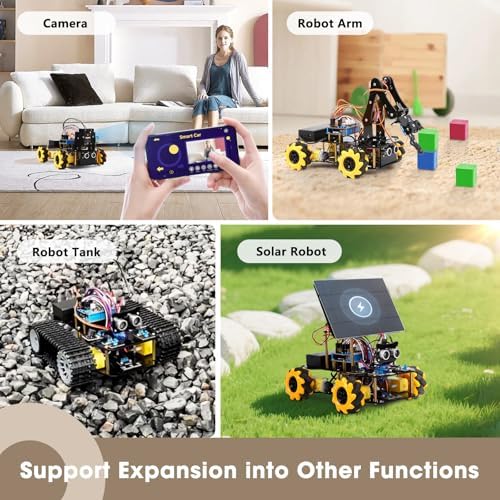
Gain How the ACEBOTT Robot Kit Heals No soldering Jumper wires and keyed cables. A 10-year-old can do it alone. Safe. Full-color photo manual Every step shown with a photograph. No guesswork. No frustration. 12 example projects Working code for line follow, obstacle avoid, gesture control, etc. Immediate success. Scratch + Python + Arduino Start with blocks. Move to text. One robot covers elementary to high school. Sturdy acrylic chassis Transparent, durable, and looks professional. Survives wall bumps. 4 sensors included Ultrasonic, line-tracking, RGB LED, buzzer. The ACEBOTT Robot Kit sees, hears, and lights up. Bluetooth app included Free app for iOS and Android. Drive the robot from your phone. No computer needed. Open-source ESP32 Standard pins. Add any sensor (temperature, gas, PIR, etc.). Endless growth. USA customer support Email and phone. 1-year warranty. Free replacement parts. You are not alone. -

Tags (ACEBOTT Robot Kit)
#ACEBOTTRobotKit,#ACEBOTTRobot,#STEMRobot,#RobotKitForKids,#CodingRobot,#ESP32Robot,#ArduinoRobot,#PythonRobot,#ScratchProgramming,#LineFollowingRobot,#ObstacleAvoidanceRobot,#BluetoothRobot,#RobotForBeginners,#ElectronicsKit,#LearnToCode,#STEMToys,#EducationalRobot,#RobotForAges8Plus,#SolderingFreeRobot,#DIYRobot,#ACEBOTTSTEM,#ClassroomRobot,#HomeschoolRobot,#FutureEngineer,#RobotKitUnder100,#USACompatibleRobot -

-

-

-

Frequently Asked Questions (FAQ)
Q1: What age is this robot kit for? Can my 7-year-old do it alone?
A: The ACEBOTT Robot Kit is recommended for ages 8 and up, with varying levels of independence:
Age Independence Level Adult Help Needed 8–9 Some help needed 50% – especially for small screws and wiring 10–11 Mostly independent 25% – occasional help with troubleshooting 12+ Fully independent 0% – can build and code alone Adult Fully independent 0% – fun for parents too For a 7-year-old: They will likely need significant adult help, especially with the small screws and understanding the wiring diagram. However, many 7-year-olds have successfully built this ACEBOTT Robot Kit with a parent alongside them. The bonding experience is valuable. Just set aside 90 minutes and be patient.
For classrooms: Teachers report that 4th graders (9–10 years old) can build the kit in pairs with minimal teacher intervention. The color-coded cables and photo-based manual make it accessible.
The “hypnotic” factor: Once built, even 6-year-olds can drive the robot via the Bluetooth app and watch it follow lines. The coding part requires reading ability (8+), but the play part is for all ages.
Q2: Do I need any prior coding or electronics experience? I am a parent who never learned this stuff.
A: No prior experience needed. The ACEBOTT Robot Kit is designed for absolute beginners – including parents who want to learn alongside their children.
What the kit assumes you know:
-
How to use a screwdriver.
-
How to match colors (purple cable to purple port).
-
How to read basic English (the manual is in English).
What the kit teaches you:
-
What an ESP32 is (the robot’s brain).
-
What sensors do (ultrasonic measures distance, IR detects lines).
-
How to write a simple program (Scratch blocks).
-
How to upload code to the robot.
For nervous parents: Start with the Bluetooth app. Do not code anything. Just assemble the robot (the manual walks you through every screw). Then drive it around with your phone. Your child will be thrilled. Later, when you are both comfortable, open the Scratch software and try the line-following example. The code is already written. You just click “upload.” Success on the first try builds confidence.
For parents who want to learn: The ACEBOTT manual includes a “Coding for Beginners” section that explains variables, loops, and conditionals in plain English. No computer science degree required.
Q3: Can this robot be used for school science fairs or STEM competitions?
A: Absolutely. The ACEBOTT Robot Kit is an excellent platform for science fair projects and school STEM exhibitions. Here are project ideas past customers have submitted:
Project Idea Sensors Used Difficulty Line-following delivery robot IR line sensors Beginner Obstacle-avoiding vacuum robot Ultrasonic sensor Beginner Gesture-controlled car Ultrasonic sensor (hand distance) Intermediate Bluetooth-controlled spy robot Bluetooth module + phone app Intermediate Light-following robot (flashlight) Photoresistor (add-on sensor) Advanced Maze-solving robot Ultrasonic + IR sensors Advanced Voice-controlled robot External voice module (add-on) Advanced Science fair advantages: ACEBOTT Robot Kit
-
The transparent acrylic chassis shows off the electronics (judges love seeing the “guts”).
-
The ESP32 is a real microcontroller (not a toy). Judges take it seriously.
-
You can program custom behaviors that no other robot has.
-
The robot is small enough to fit on a standard science fair table (7″ x 6″).
For competition use: Check your local competition rules. Some require original code (not just example projects). The ACEBOTT kit allows full custom programming in Arduino C++ or Python, so you can write 100% original code.
Final Summary (ACEBOTT Robot Kit
Feature Benefit for USA Families and Students No soldering Safe for kids. No hot tools. Plug-and-play cables. ESP32 controller Powerful, WiFi + Bluetooth, future-proof. Scratch + Python + Arduino One robot grows from elementary to high school. 12 example projects Immediate success. Line follow, obstacle avoid, gesture control, etc. Full-color photo manual 48 pages. Every step shown. No confusion. 4 sensors included Ultrasonic, IR line tracking, RGB LED, buzzer. Bluetooth app control Free iOS/Android app. Drive from your phone. Sturdy acrylic chassis Transparent, durable, looks professional. Expandable platform Add temperature, gas, PIR sensors. Endless projects. STEM.org accredited Meets USA education standards. Valid for schools. 1-year warranty USA customer support. Free replacement parts. Affordable price Under $60. Cheaper than one coding tutoring session.
The ACEBOTT Robot Kit is more than a toy. It is a gateway. A child who builds this robot learns that they can make things that move, think, and react. They learn that code is a superpower. They learn that failure is just a bug to fix. And they have so much fun doing it that they forget they are learning.
“Robotics for Baby Hypnotic New Toys” – because once they start, they cannot look away.
-


clickz4clickz4 –
Best Kit I’ve Seen in 12+ Years
I have been involved in competitive robotics (and robotics education) for over 12 years. — This is the best beginners kit I have ever seen.When you buy a robotics kit, you are buying three things. The engineering to design the kit, the physical parts of the kit and the instructions/lessons that come with the kit.First things first, this kit uses what we call COTS parts. (Common Off The Shelf) You could basically buy every part from Amazon and make your own kit. The laser cut acrylic chassis is custom and the sensors are on custom breakout (mounting) boards. But more or less all the components are off the shelf. The engineering comes in making sure they all work together and the few custom pieces fit properly.This is where many kids robotics kits end. You get parts, they sorta work together and if you’re lucky an app to go with it.ACEBOTT bills itself as a robotics education company not a toy company. I can see why. There are hundreds of pages of documentation with this kit. It’s like enrolling in a college course, not buying a toy. Sure the kids have fun while they learn but make no mistake, you can use this kit to do a whole lot of learning. The kit even has an adventure game type thing to keep the student interest. (see picture)This kit is the ‘base’ kit the student can add on to for years. I believe every add-on is available on Amazon. On the software side they give lessons with three different programming environments (languages) and the student can work their way up to a very advanced level. (python) It’s amazingly well thought out.Overall the instructions (really lessons) are great with one exception. They are obviously not written by a native speaker and it’s painfully obvious. But if you look past that, the lesson content is amazing.As far as the price goes, adding up the parts in my head, the price is very close to what the base parts would cost you. But that does not include the lessons which are priceless. I’ll say this: I’ve probably bought (or donated) over $10,000 in robot stuff. I can say without a doubt this is the best value kit I have seen. And it’s not close.Two final important notes.1) If you’re a parent and you buy this, just know they may not take to it. But that’s ok. Most parents buy their kids musical instruments when they they are young. Few kids grow up to play but parent are ok with that. Robotics might not be their thing. Keep it around, hopefully they will grow into it.2) It’s near impossible for me to give you an age range on this. An interested 8 year old with LOTS of adult help would get a lot out of it. I’d think 6th-7th grade might be the lower limit if they are learning solo. You do not need to be a geek parent to help the kid. You can use this to learn too.My conclusion won’t surprise you. Buy it.
2 people found this helpful
George GilmanGeorge Gilman –
Bored my STEM focused nephew due to subpar instructions
I have a nephew in the middle of the reported age range of this product. He’s a bit of an engineering prodigy and has won some local STEM awards, including college scholarships, which is awesome for his age. As a practicing engineer myself, I’m very proud of him and try to encourage his advancement in this area as much as I can so picked up this kit to work on with him.We spent a couple of hours on this project, primarily him working on it with my supervision. The instructions are all online so I printed them out for him to have access. While I appreciate the design and concepts behind it all, I personally found the instructions to be a bit lacking in places, being unclear on exactly how things fit together during the mechanical construction. At this point, we haven’t gotten to programming yet but even though this type of thing is exactly up my nephew’s alley, he became bored with project relatively early on and abandoned it. The impression I got was that it was primarily due to the instructions as a couple of times, he’d put something together only to find out he had it backwards or something and need to re-assemble.I ended up finishing the mechanical assembly myself. Though I earned a degree in engineering many years ago, I found there were a couple of places myself that required some thought into how things were to be constructed. I didn’t have any big issues, but I could certainly see where someone less experienced would be frustrated with the kit.Personally, I love the design and all the things you can do with it. I just wish that for the advertised age range, things were a bit simpler to construct. Having connectors or screw holes that can only be done one way, that sort of thing. Or possibly outline some tests along the way, building things up module by module, as is good engineering practice anyway. Either that, or increase the advertised age.We haven’t worked through any of the software development yet. I’m hoping that with the graphical nature of the programming, my nephew will stay better engaged and we can still use it as a learning tool for that.I’m a little torn on scoring the stars on this one. I love the product but with it boring my nephew, who is the exact target of this product, I’ve got to take something away.
S. MillerS. Miller –
Very cool, fun, and educational
I’m a kid in my 50’s and thoroughly loved this. My dad brought home an Apple ][+ computer when I was 12 years old and I become obsessed. It turned in a 40+ year career for me. I think all kids should be exposed to a few STEM projects – you never know what might trigger a lifelong passion or career. Worst case, your kid is not interested and you are out a few bucks.I had never heard of the company ACEBOTT, but I would suggest taking a look at their website. They are really trying to bring robotics and programming to the young masses. They have great products, software, tutorials, videos, and education programs for schools.This is actually my second ACEBOTT kit. My first was a combo package of this Smart Robot Car (QD001) plus the Robot Arm Expansion Pack (QD007). Honestly, I found this robot car to be the most fun to build and use, so I would start here. You can always buy the expansion packs separately if you want to continue with more. This second car was built by my son so we can do battles and stuff.This kit is really fun to build. We spent about 2 hours for the first time through and a little less for the second build. They have Lego-like instructions on their website as well as instructional videos on YouTube.Once assembled, you can freely program them to do whatever you want. ACEBOTT has their own program call ACECode, but you can also use other programs such as the Arduino IDE or Microsoft MakeCode. The ACECode software is a great place to start, and it includes a bunch of sample apps to get your robot going right away.The ACECode program is great for newbies. You can use their drag-and-drop “blocky” interface to build apps with little knowledge about programming languages. However, there is a window on the side that shows the resulting underlining C code or Python code that is being built as you drag the building blocks around. It’s a brilliant way to teach programming – over time, users can start making changes directly to the C or Python code.As for ages, ACEBOTT recommends 16+. That seems about right, but I would definitely say younger kids could grasp this if they seem STEM minded (or have help from STEM minded parents/siblings). I think the fear is that you don’t want to push kids away from STEM if they are too young and get frustrated.
2 people found this helpful
TFM –
Great Robotics Kit, More Advanced than Age 8 as Suggested, Lithium Batteries Not in Box
This is a great STEM kit for a young person with exceptional interest in robotics and programming. I confess to being an older scientist (biologist) thinking it would be fun to do it myself and then give it to a young family member. I think is more of a project for a child of 12 or older, rather than 8+ as stated. The parts are well made, well-packaged and labeled. There are no print instructions so it requires downloading tutorials from ACEBOTT and working from those. It also ships without the two required lithium batteries and those are not easily available or to get shipped in Hawaii so be sure you can get the 18650 Li-on batteries. Documentation with the kit is very limited so you will rely on the tutorials to make it work. Children in my family are too young for this, but it will be useful in our local school robotics program. I gave up early on as I think some children might do, but a kid with strong interests in robotics would likely enjoy the challenge.
HonuetteHonuette –
Well done! Great Kit to “Empower Children, Create Future”
11 yo LOVES this. He’s really into robotics and dove right in to put this kit together. The instructions were pretty good – mainly he relied on the photos and only read the words when necessary. Instructions are available via QR code but we printed them out at his request to avoid continuously referring to a phone screen. The parts are well made with precision. One drill hole for the plate for the robot car computer was slightly off alignment so an intended screw couldn’t be used there, but there were three other attachment points for the same piece that seemed to adequately secure it. The many pieces were labeled well. Cute features were noted including the cat-head shaped sensors plate and many stickers. The photo is after about 2 hrs. of focused assembly. We still need to get batteries (two 18650 rechargeable lithium 3.7V) and finish the robot arm so he plans to work on both tomorrow. He’s excited about the prospect of programming the robot. Assembling this kit gave him a real sense of independent accomplishment, and he pointed out the motto on the box, “Empower Children, Create Future”. It made a great and educational afternoon project! (He thinks an 8 yo might be a little challenged putting it together.)
CharlesCharles –
Decent, but not completely kid friendly.
All parts come in small resealable baggies, but are loose within the container itself. This lead to a few of the components being slightly bent, not so badly as to be in danger of separation, but definitely puts undue stress on the pins.There are no instructions included within the container. You have to download them from a qr code. The qr code leads to website containing multiple different tutorials for other parts, requires some looking to actually find the correct tutorial.The tutorial is 2.4 gigabytes zipped because it also includes all of the expansion packs in one set.The file name scheme is abysmal, with nothing to indicate which file is for which module or for the car itself. The instructions are pretty standard, nothing amazing but definitely simple and thorough enough for children to followThe included battery pack is made for 18650 cells, which aren’t included along with the product. A link to the cells to purchase separately is included. No alternative method for power is suggested/provided.ESP32 is equipped with USB power as well as barrel jack.The kit includes a full roll of electrical tape, though not inside of its own package, leading to sticky residue over some of the bags and components.It has a custom ESP shield to plug all components into, which makes this kit less of a wiring project and more of a coding project with construction parts. The wires seat nicely and should be fine for most kids. However, any adults helping them may struggle to manipulate the wires with their larger hands.The acrylic sheets were pretty difficult to separate from their covers. It took a sharp object to actually peel it back.Hardware fits together well, included cross wrench and screwdriver aren’t amazing, but adequate for putting the kit together.Overall, this is a decent kit with some nice parts, is a lot of fun to assemble, and a great way to learn robotics. However, young children will need some supervision to get this assembled.