










Advanced STEM Science Kit – Biped Robot Building Toy for Creative Problem Solving

Why This Advanced STEM Science Kit Matters Now
The interest in STEM toys in North America has never been higher, with the market valued at nearly $840 million in 2024 and projected to double by 2035. A significant 60% of parents now look for STEAM skill-building toys, moving away from purely entertainment-focused purchases. The ACEBOTT Advanced STEM Science Kit fits perfectly into this trend by focusing on functionality and learning, teaching real programming languages like Scratch, Arduino, and Python, rather than just being another remote-controlled robot.
Who Is This Kit For?
This Advanced STEM Science Kit is designed for a specific audience:
-
Best for Ages 12+: While the product lists an age range of 8-12, the complexity of assembly, coding, and the required patience make it more suitable for kids aged 12 and up, especially those who have some prior interest in building or coding.
-
Great for Teens & Makers: It serves as an excellent introductory platform for teenagers (12-15) new to robotics and IoT (Internet of Things) projects.
-
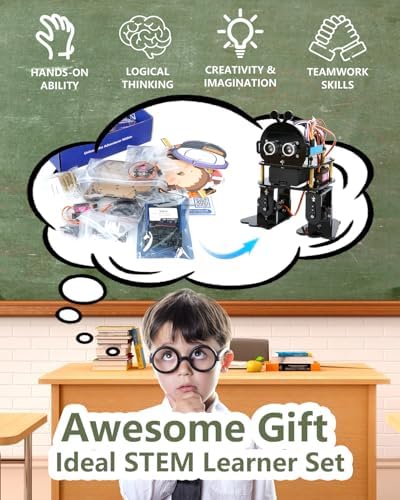
Ideal for Classroom & Home Learning: With 8-16 guided lessons, this Advanced STEM Science Kit is a ready-to-use curriculum for K-12 educators or homeschoolers.
Key Features That Unlock Learning
This Advanced STEM Science Kit is packed with features that make it a truly educational tool.
-
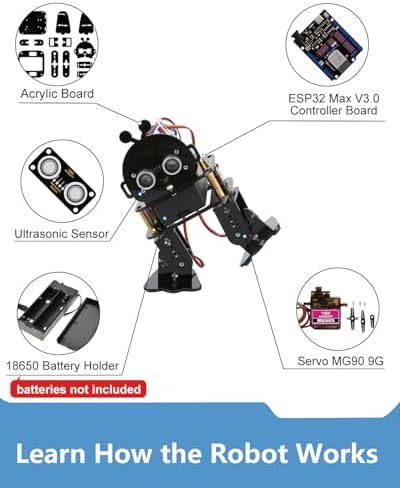
ESP32 IoT Controller Board: Unlike basic toys, this Advanced STEM Science Kit uses an ESP32 Max V3.0 board with built-in Wi-Fi and Bluetooth. This allows the robot to connect to the internet and be part of IoT projects, preparing kids for real tech applications and advanced programming.
-
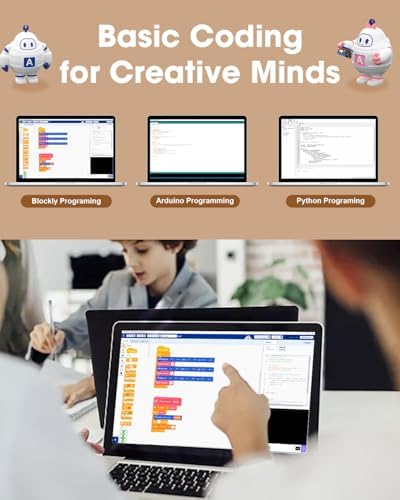
Triple Programming Language Support: The biggest educational advantage is its support for ACECode (Scratch-based block coding), Arduino IDE (C++), and Python. This creates a natural learning path from simple, visual coding to complex, text-based development.
-
Bionic Bipedal Design: The robot’s two-legged design teaches crucial engineering concepts like balance, center of gravity, and coordination mechanics—a unique challenge not found in standard wheeled robot kits.
-
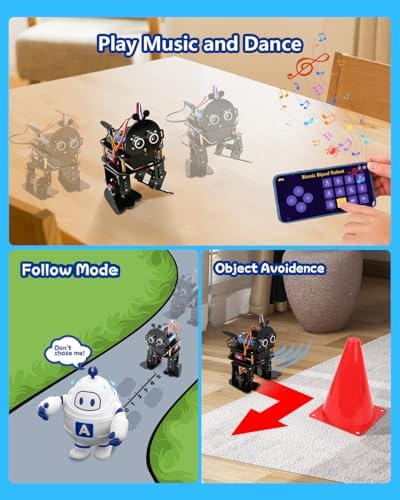
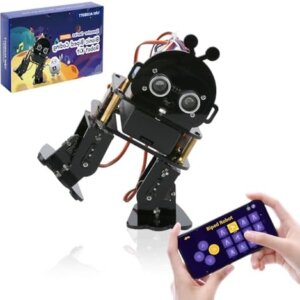
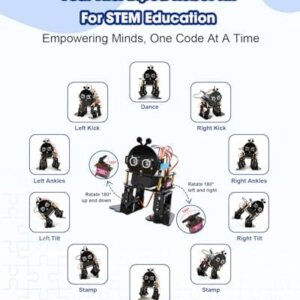
Rich Interactive Features: Comes with 12 pre-programmed actions (kick, follow, stamp, object avoidance, etc.) and full 4-directional movement, with 6 custom face masks to personalize the robot for fun role-play scenarios.
How It Stacks Up Against the Competition
To help you decide, here is how the ACEBOTT compares to other popular Advanced STEM Science Kits on key features:
| Feature | ACEBOTT Bionic Biped (This Kit) | Makeblock mBot | LEGO SPIKE Prime | ELEGOO UNO R3 Smart Car |
|---|---|---|---|---|
| Type | Bipedal Walking Robot (4-DOF) | Wheeled Car Robot | Modular Building System | Wheeled Car Robot |
| Difficulty | Intermediate to Advanced | Beginner | Beginner to Intermediate | Intermediate to Advanced |
| Controller | ESP32 Max V3.0 (Wi-Fi/BT) | Arduino UNO | LEGO Intelligent Hub | Arduino UNO R3 |
| Programming | Scratch, Arduino, Python | Scratch, Arduino | Scratch-based | Arduino (C/C++) |
| Build Time | 2-4 hours | 15-30 min | Varies (Modular) | 2-3 hours |
| Price Range | $50-60 | $70-100 | $300-400 | $60-80 |
| Best For | Mechanics, coding, walking robots | First-time robot builders | Classroom & creative building | Electronics & Arduino |
| Perfect Gift For | Teens interested in how things work | Kids ages 8-12 | Kids 10+ who love LEGOs | Kids 10+ interested in electronics |
👍 Pros & 👎 Cons
👍 Pros
-
Excellent Value & Future-Proofing: Priced at $55.99, it is a budget-friendly way to introduce real robotics, teaching advanced concepts like IoT and three programming languages that can grow with the child.
-
Educational Depth: Comes with a full 8-lesson curriculum and step-by-step tutorials, making it a complete educational package rather than just a one-time project.
-
Creative Personalization: The ability to design custom action scripts and switch between 6 unique face masks encourages creativity and allows for hours of extended play.
👎 Cons
-
Missing Parts & Quality Control: Some customer reviews report missing screws or other components, which are frustrating for a building-focused Advanced STEM Science Kit.
-
Challenging App Connectivity: Several users have found the app connection to be unreliable, with issues like constant buffering and Wi-Fi connectivity problems preventing the robot from being controlled.
-
Short Battery Life: Customer feedback indicates battery life is often less than expected, requiring frequent recharging, which can interrupt the fun.
-
Time-Consuming Assembly: Building a bipedal robot (2-4 hours) requires patience; if your child gets easily frustrated, the complex mechanics could be a turn-off.
-
No Batteries Included: The product description clearly states batteries are not included, so you will need to purchase them separately, which is an often-missed detail.
The Ultimate Buying Guide for an Advanced STEM Science Kit
Before you make a purchase, use this checklist to pick the perfect kit for your child:
-
Assess Your Child’s Skill Level vs. the Kit’s Difficulty: Match the kit’s complexity with your child’s experience. Beginners should look for kits with clear, step-by-step instructions, while more advanced kits offer open-ended projects.
-
Align Their Interests for Sustained Engagement: Choose a kit that matches their passion. If they love animals, a bionic biped robot might be a hit; if they are car enthusiasts, a wheeled car kit is a safer bet.
-
Ensure Long-Term Value Through Platform & Software Support: Check if the kit supports widely used languages like Arduino (C/C++) and Python. These are industry standards that ensure the skills are transferable and the kit remains relevant.
-
Factor in Hidden Costs: Always check if batteries are included. For advanced kits, you may also need a separate soldering iron. Avoid unexpected trips to the electronics store by reading the fine print.
-
Research Post-Purchase Support: Verify the availability of detailed tutorials, customer support, and online communities to help navigate any technical issues that may arise.
FAQs About the ACEBOTT Advanced STEM Science Kit
1. Is this kit suitable for a complete beginner who has never coded before?
Yes, it is designed for beginners. It includes ACECode, a drag-and-drop programming environment based on Scratch, paired with a detailed 8-lesson tutorial that guides you step-by-step through the coding and assembly process.
2. How long does it take to assemble the robot?
While assembly time can vary, most users report it takes between 2 and 4 hours. This is one of the more time-consuming projects compared to simpler, wheeled robot kits, so adult supervision or assistance may be helpful.
3. Do I need to buy any extra tools or parts?
The Advanced STEM Science Kit includes all the components, servos, and a mini screwdriver for assembly. The only thing you will need to purchase separately is a battery (not included). Always check the specific battery requirements before purchasing.
4. What is the robotic arm’s payload capacity?
The Advanced STEM Science Kit is a biped robot designed for walking and dynamic movement, not lifting heavy objects. Its primary focus is mastering bionic locomotion, coding, and stability rather than functioning as a strong robotic arm.
5. How does this compare to the LEGO SPIKE Prime set?
The ACEBOTT Advanced STEM Science Kit is an excellent, low-cost alternative ($55 vs. ~$350). While LEGO offers a more polished, modular, and durable building experience, ACEBOTT provides comparable deep-learning outcomes in programming (Arduino, Python) and robotics, making it the better value for budget-conscious families.
Final Verdict
The ACEBOTT QD021 kit is a powerful and affordable Advanced STEM Science Kit that punches way above its weight class for $55.99. Its ability to teach industry-standard coding languages and its unique bionic design offers a fantastic return on investment for a child genuinely interested in how robots think and move.
However, this is not an advanced STEM science kit for casual play. The potential for missing parts, app connectivity hurdles, and a time-intensive build mean it is best suited for a patient, motivated teen (12+). If you are looking for a high-quality, educational challenge that will provide a real sense of accomplishment, this Advanced STEM Science Kit is a great choice. If the potential for assembly frustration is a concern, you might consider exploring a more beginner-friendly Advanced STEM Science Kit like the Makeblock mBot or a more premium option like the LEGO SPIKE Prime for a smoother experience.
Is there a specific part of the buying process we can help you navigate further, such as finding an ideal learning space at home or recommending complementary projects to keep the momentum going?



John –
An awesome way to develop constructive curiosity and also in building rapport with your child!
The media could not be loaded.
This robot is fairly easy to build, perfect for even a child to complete with a bit of adult supervision. It does contain tiny bolts and nuts so I probably won’t recommend this product for toddlers as it can be a bit of a choking hazard. The set does not come with any printed manuals/instructions but instead, provides a QR code link to the manufacturer’s website for the user to download it on their own. It’s quite a large zip file, at over 500mb or just over half a gig in size. But this is understandable as it includes multiple lessons in addition to chipset drivers for multiple operating systems including even Linux! So thumbs up there in terms of compatibility.Aside from the drivers, the user is required to download Arduino IDE, a programming IDE/ROM-flasher/Serial-Monitor software to load the user’s code onto the ESP8266 chip, the “brain” of this quadruped robot. Halfway through building the robot, the user is required to flash a template code which the user will later find to be quite aptly named, to “zero” in the positions of the installed servos. This is essentially calibrating the servos for the robot to function properly so please do not skip this step!One more tip, instructions call for the user to use the “burn bootloader” function to load the user’s code to the ESP chip. This does not seem to work, at least with the most recent version of Arduino IDE. ESP8266 is an Arduino clone, and a variant one at that. So there’s really no reason for the developers to go out of their way and devote their own resources to support it. No worries though, simply choose either the “Upload”, or “Upload using programmer” options and it should work without a hitch.Finally, the user can code their own subroutines for the spider robot based on the lessons provided. Alternatively, they can opt to simply flash a completed template included in the downloaded file. The user can download the app specified in the manual and control the robot directly in minutes with the latter option. Once the robot is flashed with the template included in the last lesson, it broadcasts its own WIFI network that the user can connect to with their smart device. They can then launch the app and start messing with all pre-defined routines aside from simply moving it from point A to B.To close, you will find that your child will get a kick out of building this robot. Both the journey and the reward is equally fun and an enjoyable experience altogether. I’d highly suggest that an adult gets involved as they will find the experience quite bonding and meaningful in and of itself. The “replayability” of something like this is potentially limitless as the child can learn and modify the codes to add or even change subroutines entirely to suit their needs. I even find its current list price to be more than fair with a bit of sale going on at the time of writing.All in all, it’s truly deserving of 5 full stars in my opinion. Highly recommended, but please urge the builder to read the documentation in depth and completely.
One person found this helpful
zekefarsiguy –
An awesome kit, though some of the screws and nuts are quite small.
A very fun kit for learning about servo motors and coordinates. It is a bit difficult to put together when it comes to the M2 screws and nuts. Once it is assembled, it works very well. I have a cheaper version than this one, and I prefer this one 100% for the cost.
clickz4clickz4 –
One of the Best Kits I’ve Seen in 12+ Years
I have been involved in competitive robotics (and robotics education) for over 12 years. — This is one of the best kits I have ever seen.It’s meant as a ‘second’ kit not a complete beginner kit although you could use this as a first kit.For the mechanicals and electronics this kit uses mostly what we call COTS parts. (Common Off The Shelf) You could buy most of the parts from Amazon and make your own kit. The laser cut acrylic chassis parts for the base and the arm are custom and the electronics are on custom breakout (mounting) boards. But more or less the components are common. The engineering comes in making sure they all work together and the custom pieces fit properly.On the software side they give lessons with three different programming environments (languages) and the student can work their way up to a very advanced level. (python)ACEBOTT bills itself as a robotics education company not a toy company. I can see why. There are hundreds of pages of documentation with this kit. (The first tutorial is 98 pages.) It’s like enrolling in a college course, not buying a toy. Sure the kids have fun while they learn but make no mistake, you can use this kit to do a whole lot of learning.Overall the instructions (really lessons) are great with one exception. They are obviously not written by a native speaker and it’s painfully obvious. But if you look past that, the lesson content is amazing.Once assembled, the arm worked well and seemed fairly robust.As far as the price goes, adding up the parts in my head, the price is very close to what the base parts would cost you. But that does not include the lessons which are priceless. The price is a bargain.It’s near impossible for me to give you an age range on this. An interested 8 year old with LOTS of adult help would get a lot out of it. I’d think 6th-7th grade the lower limit if they are learning solo. You do not need to be a geek parent to help the kid. You can use this kit to learn too.Overall this ACEBOTT kit is another in a very impressive line of kits that I can recommend without reservation.
ScrimshawScrimshaw –
Cool smaller scale robot kit – App ONLY and no battery included — but very fun!
The media could not be loaded.
UPDATE: I finished building this, and wow is it fun. It’s a little tricky to get the legs set in the right initial positions (I modified them from what the directions said), but then it works great. The app connects directly to the wifi on the ESP8266 (you have to disconnect from your mobile data too, or it won’t connect), and has a lot of built-in patterns, like waving hello, doing push ups, making a fighting stance, etc., as well as the standard moving and turning. The app is available in the app store, and can control all the AceBott robot products from the same app. It’s really fun, and my kids love it. It works best on a smooth surface, and doesn’t work well on carpet – the feet need to be able to slide freely. Also, make sure there is enough slack in the wires for the servos to move freely. You can use either a button top or flat top 18650 battery, but it fits best with a flat top. Make sure the batter is fully charged, or the robot’s actions will seem a little anemic. And make sure the battery is turned OFF any time you connect it to your PC to program it. Very fun kit, and I am upgrading it to 5 stars (but I still wish it came with an IR remote and battery).Original, unedited review below:This is a great robot kit. It’s a bit smaller scale and less complexity than some of the other offerings from Acebott, but it’s excellent nonetheless. It uses an Acebott branded ESP32 dev board (similar to standard boards from other sources, but not necessarily identical, since pinouts are not standardized) that plugs into a custom servo motor control board, with a battery holder on the underside for a single 18650 battery. Of course, the spider only has 4 legs (2 servos per leg), keeping it simple, but still very fun. Of course, with only 4 legs it doesn’t move like an actual spider.It connects ONLY via the app, which means you must use a smart phone to control it. There is no simple IR remote that also works, like with most of the wheeled kits. It also doesn’t come with the single 18650 battery needed, which I feel like it should come with. With these drawbacks, I am going to subtract one star for overall value, leaving this great kit with an overall 4 star rating. I haven’t had a chance to build it yet, but I’ll update this review with a video once I do.
Scott –
Fun
So the reason for the four star is the fact that they don’t include any written instructions in the box. The only instructions that are available are on their website for download, which could be an inconvenience for someone who don’t have access to the Internet therefore making this kit useless, but if you do have Internet service, then you do download the instructions. It is overall a fun little project great for all ages
R & D Guy –
The life like movements made it almost seem to come to life with its own personality.
Ease of Assembly: Excellent everything went together without a hitch.Value for the Money: Very goodBuild Functionality: Has been more function than I expectedSize: Not really small but I would’ve liked it to be just a little biggerFit: Perfect for the age group recommendedFun for kids: Here is we really excelled. so many of these education toys move around in some fashion or do some minor task with the capabilities of this little robot made it almost lifelike. I swear it had its own personality.
vacuumsvacuums –
Great kit, needs special batteries
I’ve gotten other kits from this company before, their car kit and the robot spider kit. I liked them a lot and I like this robot arm kit as well. You really do assemble it from scratch. There are a ton of pieces and it’s reasonably complex. There are online manuals and software that you download to get everything running.I think the age recommendation of 10 and up is probably a good one. And you would want the 10 year old to be somewhat mature and patient as well. Unless you are getting this for an older teen, I would expect to be helping a fair amount with downloading things and installing drivers. Some of the assembly can be a little tricky as well with small screws and such. That said, it is quite worthwhile to put it together. Teaches kids to really work at something and put in effort.The kit is good quality but isn’t bulletproof once assembled. You have wires and things that are somewhat exposed.Keep in mind that it doesn’t come with batteries and you will need 18650 rechargeable batteries and a charger. So if you don’t already own some of those batteries for something else, it might change the value proposition for you. If you have them already this is a pretty good value for what you get, if you don’t it could get a little pricier. If you intend to maybe buy multiple kits, then you could reuse the batteries in other robots.
A Jones –
STEM Robot
I received the Biped Robot Kit and it’s one of the most exciting STEM toys I’ve tested. Designed for kids ages 8–12, this bionic bipedal robot offers hands-on learning in coding, robotics, and engineering—all wrapped in a fun, interactive package.Introduces key STEM concepts like programming, circuitry, and mechanical design in a kid-friendly format.Encourages problem-solving, creativity, and logical thinking through build-and-code activities.The kit includes all necessary components, with clear instructions that guide kids through assembly.The bipedal movement is impressive watching the robot walk is both fun and rewarding.Requires some adult supervision for younger users, but older kids can tackle it independently.Programmable via smartphone or computer, with intuitive interfaces that make coding accessible.Offers customization options, so kids can tweak behavior and experiment with different commands.This Biped Robot Kit is a brilliant blend of education and entertainment. Whether your child is new to robotics or already tech-savvy, it offers hours of engaging, skill-building fun. Highly recommended for parents, educators, and anyone looking to spark a love of STEM in young minds.
Marietta STEAM Mom –
Bad engineering, doesn’t really move, needs $15 battery sold separately
The media could not be loaded.
Bad engineering. Not strong enough (or legs long enough) to lift the body off the ground, so can’t actually move forward/backward. See video. Don’t get the spider. Very disappointed 9 year old after a lot of work.Firstly, no 8 or 9 year old is doing this independently. Have a pair of needle nose pliers or jewelry tools, tiny tiny nuts and screws are required. Second, after spending the better part of two days together, it is a pretty big fail. It isn’t strong enough to lift the battery beneath so it can’t move anywhere. It basically can twitch back and forth.Was hard right out of the box. We will never purchase from this brand again. 1. There are NO instructions. QR code does NOT take you to instructions. Takes you to their website where you have to find it buried in there. 2. Once you find the right tutorial for what you bought, you need to download – which in my case kept trying to require Dropbox- which is annoying. Any other place has a PDF to download or YouTube video links directly. That is not a big ask so this falls VERY short of expectations (even if it did work in the end) 3. No battery, and it requires a Flathead battery – not cheap and would rather have that info at the same time as ordering so we don’t have to wait longer to build this. So you can’t build it without buying additional parts for $15 – which I did NOT see in the description. If it was listed, I missed it. I could have bought this when ordering – or at least understood the additional cost to getting this running.If it did actually move around would have been 3 stars. As it was. Big fail. We might try to return. I feel this was really misleading product. Zero stars. Sad kid.
JCM –
Good robot arm learning tool
This is an educational kit designed to help you understand a simple 4DF robot arm. It requires building the arm and working through the guided tutorials on programming the arm. The tutorial and sample programs are provided online for AceCode (a Blockly-like programming language), Arduino, and Python.The build consists of the following parts: the ESP32 controller board, a laser-cut acrylic frame, and hardware (nuts, screws, and spacers). Well-written instructions are included in the tutorial. The build is straightforward but requires the use of small parts and will take at least 2 hours to complete. The kit does not include the 18650 Li batteries. These will need to be purchased separately.The example programs work quite well and provide the framework to learn the fundamental principles of robot arm control, including forward and reverse kinematics, robot arm guidance, and web control.This is a good learning tool for the beginning roboticsist, requiring some knowledge of programming.
R & D Guy –
The life like movements made it almost seem to come to life with its own personality.
Ease of Assembly: Excellent everything went together without a hitch.Value for the Money: Very goodBuild Functionality: Has been more function than I expectedSize: Not really small but I would’ve liked it to be just a little biggerFit: Perfect for the age group recommendedFun for kids: Here is we really excelled. so many of these education toys move around in some fashion or do some minor task with the capabilities of this little robot made it almost lifelike. I swear it had its own personality.
R & D Guy –
The life like movements made it almost seem to come to life with its own personality.
Ease of Assembly: Excellent everything went together without a hitch.Value for the Money: Very goodBuild Functionality: Has been more function than I expectedSize: Not really small but I would’ve liked it to be just a little biggerFit: Perfect for the age group recommendedFun for kids: Here is we really excelled. so many of these education toys move around in some fashion or do some minor task with the capabilities of this little robot made it almost lifelike. I swear it had its own personality.
R & D Guy –
The life like movements made it almost seem to come to life with its own personality.
Ease of Assembly: Excellent everything went together without a hitch.Value for the Money: Very goodBuild Functionality: Has been more function than I expectedSize: Not really small but I would’ve liked it to be just a little biggerFit: Perfect for the age group recommendedFun for kids: Here is we really excelled. so many of these education toys move around in some fashion or do some minor task with the capabilities of this little robot made it almost lifelike. I swear it had its own personality.
R & D Guy –
The life like movements made it almost seem to come to life with its own personality.
Ease of Assembly: Excellent everything went together without a hitch.Value for the Money: Very goodBuild Functionality: Has been more function than I expectedSize: Not really small but I would’ve liked it to be just a little biggerFit: Perfect for the age group recommendedFun for kids: Here is we really excelled. so many of these education toys move around in some fashion or do some minor task with the capabilities of this little robot made it almost lifelike. I swear it had its own personality.
R & D Guy –
The life like movements made it almost seem to come to life with its own personality.
Ease of Assembly: Excellent everything went together without a hitch.Value for the Money: Very goodBuild Functionality: Has been more function than I expectedSize: Not really small but I would’ve liked it to be just a little biggerFit: Perfect for the age group recommendedFun for kids: Here is we really excelled. so many of these education toys move around in some fashion or do some minor task with the capabilities of this little robot made it almost lifelike. I swear it had its own personality.